Posts

Showing posts with the label Visual Studio

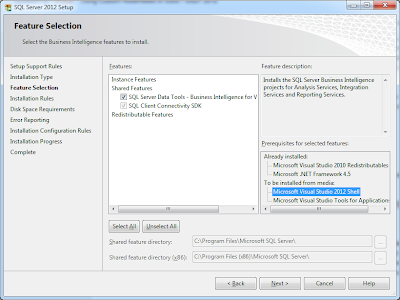
SSDT With Visual Studio 2012 and Using Custom Assemblies
Image
SQL Server Data Tools SSIS 2012 / SQL Server Data Tools (SSDT) offers considerable benefits over SSIS 2008 / Business Intelligence Development Studio (BIDS). The UX is much quicker, smoother, feature rich (undo and redo, woohoo!), and one of the best new features is that we can finally attach the debugger to script components - which has been a bit of an issue in the past . It's not exactly perfect (opening the VSTA environment seems to take a lot longer than it used to, breakpoints are unpredictable, and there are a few little issues surrounding package encryption that I keep running in to), but the improvements are more than welcome, and certainly enhance development. If you're familiar with SSIS, but you've avoided script tasks / components before, I have to say you're missing out; they're very powerful tools in the right hands, and basically allow you to do anything you can do in a .Net app within the context of a control flow or data flow in a package. Do...

Long running processes: C# 5, Visual Studio 11, async and await; updating a Winforms UI asynchronously

Image
I recently downloaded Visual Studio 11 Beta  in order to take a look at the new 4.5 .Net Framework and play around with its new features. I decided to take the opportunity to build a "quick" app that I've been meaning to build for a few years; a single form Windows Client that allows me to send out an email merge to the 1,400 agents I have in my outlook contacts list, to let them know I'm available for work. Before now, every time I've needed to send an "I'm available!" email, I've copied + pasted the same email a number of times, attached my CV and BCC'd 100 or so agents at a time (too many and Outlook just falls over). Not only is it a massive waste of my time, but it's very error prone and not a very friendly way of doing things. Unfortunately, the mail merge feature of Word has its limitations, so I've had to look in to my own solution. Anyone who's worked with bulk email systems before knows fine well that any kind of mas...

Tools Round-up

The development world has been coming up with ways to improve productivity for years. However since Visual Studio 2010 was released, with its fully extensible model, things have seriously changed. Most tools have been modified to extend VS2010's already pretty awesome IDE. With just a few extensions, you can fill in almost all of the gaps the Visual Studio team have left in the VS experience. I'm not a massive fan of NuGet; I use it, but not for production sites. It's good for quickly implementing a library in a test project, but I just don't like the "bloat" you end up with. I like to know what every single file does and why its there. The same goes for WebMatrix; although handy, I much prefer to manually create projects... I somehow feel like it makes it easier in the long run, even if it takes you a while to set them up in the first place. I recently purchased ReSharper (after trying trials a number of times over the years and not getting along with it)...

Getting Visual Studio 2008 to work with Team Foundation Server 2010

Recently I've been collaborating via Team Foundation Server 2010 - it's my first time, and I'll be honest... it was very gentle. It eased me in with its promise of improved Source Control (improved over Source Safe, that is) and toyed with me, sporting its ideals surrounding automated builds and work item collaboration. Whilst I've not been directly involved with the set up, using it on a daily basis has been a refreshing change. I'm one of those developers who obsessively refactors code, renames and moves files around until I'm happy everything is in the right place, so when using Source Safe, CVS or SVN, there's quite a bit of repeat work involved when it comes to making sure the source control server is also updated. Suffice to say that TFS 2010 works beautifully in this area, keeping the local, server and project file structure the same as each other. I've been exclusively working in Visual Studio 2010 for a while now, as I've been creating n...

Visual Studio 2010 defaults to an undesired browser when opening MVC projects

A while ago, I set my default browser in Visual Studio 2010 to Google Chrome by using the "Browse With..." trick, and I've been happy with it for some time. Recently I've found that I've needed to do quite a bit of testing in IE, so I wanted to change it back. I went down the "Browse With..." route again, which seemed to work... but every time I close and re-opened Visual Studio, it reset itself back to Chrome. I've been living with it for a while, as I tend to do extended sessions anyway, so it's not been too much of a hassle... but today I've needed to close and restart Visual Studio a few times, so it's become a bit annoying. Anyway, to cut a long story short, it seems that when setting the "Browse With..." option in an MVC project, the settings aren't saved to the configuration file, probably because MVC projects don't actually have physical files to be "Browsed", unlike an ASP.Net project. I'm not ma...

Confuddled Colleagues

This follows on from my previous post on nTier. This was originally part of my first article, though it all became a bit lengthy - mainly due to the fact I ramble on like a 90 year old war veteran. I would highly recommend checking out my previous post before reading this one. An issue that tends to confuse some developers is the difference between namespaces and assemblies and where each of the layers in an nTier architecture belong in your code repository. When I write code, I always try to make an early decision what other uses it has and its purpose, and place it in the relevant namespace / assembly within my repository. Namespaces provide a convenient way to store and group your custom types. They are a hierarchical method of grouping types in your repository and the same namespace (or sub-trees of that namespace) can reside in more than one assembly. Assemblies, on the other hand, are physical files that can be included in your projects. The main benefit ...